
Top wedding day photo tools for engaged couples

TL;DR:
Wedding photographers should use a two-body camera system with dual-card recording and onsite backup to prevent missing key moments. Guest sharing tools like QR-code albums and automatic uploads capture candid shots from visitors, increasing overall coverage. Clear written agreements on workflows, backup strategies, and delivery timelines ensure confidence and smooth event management.
The top wedding day photo tools, grouped by role: photographers rely on a two-body camera system (typically Canon, Nikon, or Sony) paired with 35mm and 85mm primes, a 24–70mm f/2.8 zoom, external flash, and a gimbal for video; guests contribute best through a QR-code gallery (Pix.wedding, camera.wedding) or an automatic-upload app (Picaggo); and couples should confirm a shot list, a same-day highlights plan, and a written backup schedule with their photographer before the day.
Photographers: Two camera bodies, 35mm + 85mm primes, 24–70mm f/2.8, 70–200mm f/2.8, external flash with triggers, gimbal, lavalier microphone, dual memory cards, on-site SSD
Guests: QR-code album (Pix.wedding, camera.wedding), automatic background upload (Picaggo), WhatsApp or Google Photos as fallback
Couples: Written shot list, family group list, table QR cards, same-day highlight agreement, delivery timeline in writing
Pix.wedding reports an average participation rate of 87% when table QR cards are used, which is a meaningful number when you consider how many candid moments a single photographer simply cannot be in two places to catch.
Table of Contents
Why the right tools make or miss your wedding memories
The camera body matters less than the system around it. A photographer shooting with one body has to stop, change lenses, and risk missing the moment your partner’s face does something unrepeatable. A two-body workflow keeps a 35mm on one body for wide, environmental storytelling and an 85mm on the other for close portraits, so coverage is continuous.
Guest-sharing tools fill a different gap. No professional can be at the kids’ table, the bar queue, and the dance floor simultaneously. Automatic-upload apps act as a community memory collector, gathering candid perspectives that sit alongside the professional story rather than duplicating it.
Fast delivery depends on on-day workflow, not just editing speed
Dual-card recording protects against card failure during the ceremony
Same-day social images require a pre-agreed export plan, not improvisation
Pro Tip: Ask your photographer how many card rotations they do during the day and who performs the on-site backup. If they cannot answer specifically, that is a gap worth addressing before you sign.
What professional photographers bring and how they use it
Most pros arrive with more than you might expect. The visible kit is two cameras on a dual-strap harness; the rest lives in a bag under a table or in the car.
Camera bodies and lenses
Canon, Nikon, and Sony are the three dominant ecosystems. Within each, the lens roles are consistent: the 35mm prime handles environmental storytelling and preparation shots; the 85mm isolates the subject and flatters portraits; the 24–70mm f/2.8 covers mid-range versatility when primes are impractical; and the 70–200mm f/2.8 is the go-to for ceremony shots where you cannot move closer. For camera comparisons, the best wedding photography cameras guide covers the reasoning behind each ecosystem choice.
Lighting and stabilisation
External flash with off-camera triggers (Godox and Neewer are common choices) for receptions and dark ceremony rooms
LED panels or strip lights for evening portraits and video
5-in-1 reflector for natural-light control during outdoor portraits
Gimbal for cinematic video sequences; monopod for quick stability during ceremonies
Lavalier microphones clipped to the officiant or groom for vow audio
On-day workflow
Dual-card recording runs simultaneously so every frame is written to two cards. After key moments, the photographer ingests cards to an on-site SSD. Adobe Lightroom Mobile allows fast colour checks and a handful of same-day social-ready exports without touching the full edit. For a detailed look at video-specific gear, the videographer’s toolkit guide covers gimbals and audio in more depth.
Pro Tip: Request a written contract clause that specifies dual-card recording and on-site SSD backup. It is the single most effective protection against lost images.
How to collect guest photos without the chaos
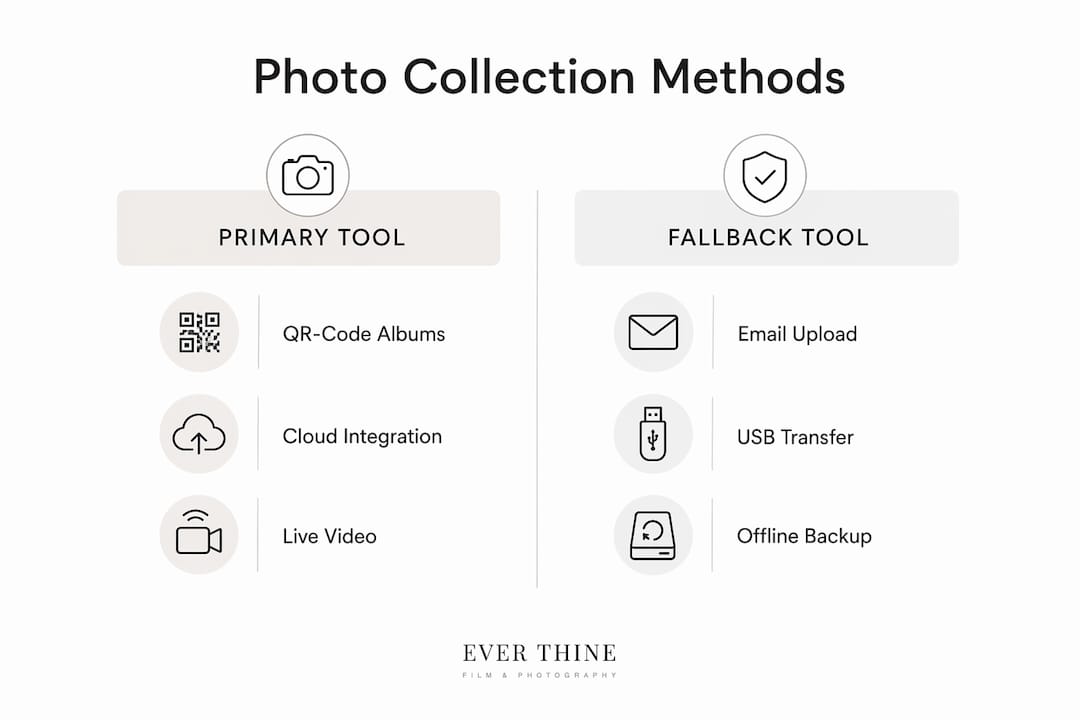
Use one primary collection tool and one simple fallback. The primary tool handles the majority of guests; the fallback catches anyone who finds QR codes confusing.
Approach | Best for | Ease for guests | Typical cost | Immediacy |
QR-code album (Pix.wedding) | High participation, no app needed | Very easy | Paid plans available | Same-day uploads |
Automatic upload (Picaggo) | Hands-free collection | Easy once set up | Paid | Morning-after full album |
QR album with live slideshow (camera.wedding) | Reception entertainment | Easy | From ~£49 one-time | Live during reception |
Combined platform (WedPort) | Photo + guestbook + video messages | Moderate | Paid | Same-day |
WhatsApp / Google Photos | Tech-averse guests | Very easy | Free | Immediate |
JoinMyMoment integrates directly with Google Photos and supports live video moments, which is useful if your guests already live inside the Google ecosystem. For creative ideas on encouraging guest participation, the guest photo ideas guide has practical examples.
Before purchasing any paid platform, confirm how long uploads are stored and whether original-resolution downloads are included. camera.wedding and Pix.wedding both offer original-quality downloads with defined storage windows depending on the plan.
Pro Tip: Print QR cards for every table and nominate one tech-savvy guest to check the upload gallery during the drinks reception. Catching a broken link early saves the whole collection.
Backup, delivery, and what to put in writing
Professional backup has three layers: dual-card recording during the shoot, on-site ingest to an SSD between sessions, and at least one off-site copy (cloud upload or a second drive taken home that evening). Any photographer who cannot describe all three layers is carrying more risk than you should accept.
Same-day social images: a small selection of edited highlights, typically delivered within hours for venue displays or Instagram
48–72-hour previews: a curated set of 20–50 images for immediate sharing
Full gallery: typically 4–12 weeks after the wedding; timeframes vary significantly, so confirm in writing
File formats: full-resolution JPEG or TIFF downloads, usually via an online gallery (Pixieset-style platforms are common), with a ZIP download option
Confirm image rights and print licences in the contract. Some photographers include unlimited personal printing; others restrict commercial use. Neither is wrong, but you need to know before you order albums.
Your photography planning checklist
Confirm kit, backup, and delivery terms with your photographer 4–8 weeks before the wedding. Use the wedding photography checklist workflow as a working template alongside the steps below.
4–8 weeks before
Confirm photographer’s schedule, travel plan, and emergency contact number
Supply a written shot list and family group list with names
Order and test table QR cards for your chosen guest-sharing platform
Nominate a tech-savvy guest to manage the upload gallery on the day
Agree same-day highlight timing, format, and delivery method in writing
Confirm backup strategy and request a sample contract clause
On the day
Ensure power sockets are accessible near the photographer’s bag area
Provide a quiet room or corner for recorded vows (reduces background noise on lavalier mics)
Walk the photographer through the procession plan and any venue restrictions (drone, flash, ceremony rules)
Check guest QR gallery is live before guests arrive
What to ask before you book a photographer
The single most revealing question is not “what camera do you use?” It is: “Walk me through what happens to my images between the ceremony and the time I receive the full gallery.” A confident, specific answer tells you everything about workflow discipline.
Suggested questions for a vendor call:
Which camera system do you use, and do you shoot with two bodies simultaneously?
Do you record to dual cards? How do you perform on-site backups?
Do you offer same-day highlights, and what does that delivery look like?
What is your turnaround for the full gallery?
Can we see a sample contract clause covering lost or corrupted images?
Are you covered by public-liability insurance, and can you share the certificate?
Trust signals to look for in replies: sample contracts with specific clauses, public-liability insurance documentation, client testimonials that mention delivery timelines, and a clear statement on image rights and print licences.
Mobile photo apps worth having on the day
Adobe Lightroom Mobile is the most capable option for on-the-go editing: selective adjustments, colour grading, and cloud sync to a desktop library. It is free at the basic tier, with advanced masking and healing tools behind a Creative Cloud subscription.
Google Photos handles automatic backup from any phone and offers shared albums that guests can contribute to without creating an account. Pixieset is the delivery platform many professional photographers already use, so couples often receive their gallery there without needing a separate app.
For guests, the simplest instruction is: take photos, open the QR link on the table card, upload. No app download, no account. That frictionless path is why QR-code albums consistently outperform hashtag-based collection on participation.
How to manage guest participation without losing quality
Set expectations before the day, not during it. A line in the order of service or on the table card (“Upload your photos here — we’d love to see your view of the day”) removes the need for anyone to explain the system mid-reception.
Quality drops when guests shoot in poor light without knowing it. Brief your nominated guest-gallery manager to remind people to turn on their phone’s portrait mode or night mode during the evening. It will not fix a dark room, but it reduces the proportion of unusable shots.
Restrict phones during the ceremony itself. A phone-free ceremony produces cleaner professional images and means guests are actually present. The guest gallery fills up quickly enough during the drinks reception and evening.
How lighting conditions shape the tools your photographer uses
Outdoor summer ceremonies in direct sun are harder to shoot than overcast days. Harsh overhead light creates unflattering shadows, which is where a 5-in-1 reflector earns its place, bouncing soft fill light onto faces without adding artificial colour. A diffuser panel does the same job when the sun is directly behind the couple.
Indoor ceremonies in churches or barns often prohibit flash during the service. Photographers working in those conditions rely on fast prime lenses (f/1.4 or f/1.8) and high-ISO capability. The Sony A7S III is specifically noted for low-light performance; Canon and Nikon full-frame bodies handle it well too.
Evening receptions almost always need off-camera flash. Godox and Profoto units on light stands, triggered wirelessly, give the photographer control over where the light falls rather than the flat, on-camera look. LED panels add continuous light for video during the first dance.
Post-wedding editing software and how photographers use it
Adobe Lightroom (desktop) is the industry standard for wedding galleries. Photographers apply a base preset across the full gallery for consistency, then adjust individual images for exposure, white balance, and skin tone. A typical wedding gallery of 400–600 images can be colour-graded in a single session using batch editing.
Capture One is a strong alternative, particularly favoured by photographers shooting with Phase One or Sony bodies, with arguably superior colour science for skin tones. Both platforms export full-resolution files for delivery.
For video, Adobe Premiere Pro and DaVinci Resolve handle the cinematic edit. DaVinci Resolve’s colour grading tools are particularly strong and the free version covers most professional needs. Couples should ask whether the video edit is colour-graded or simply cut, as the difference in final quality is significant.
Key takeaways
The single most important step is confirming a two-body workflow, dual-card backup, and a written delivery timeline before you sign any contract.
Point | Details |
Two-body system | Ask for dual-camera confirmation in writing; it prevents missed moments during lens changes. |
Guest QR galleries | Pix.wedding reports an average participation rate of 87% when table cards are used; pair with a WhatsApp fallback for older guests. |
Backup has three layers | Dual cards, on-site SSD, and off-site copy; confirm all three before booking. |
Delivery in writing | Agree same-day highlights, 48–72-hour previews, and full gallery timeline in the contract. |
Weddingfilmphotography | Operates a two-body documentary workflow with on-site backups and same-day highlight options across Staffordshire, Derbyshire, and Worcestershire. |
Why documentary kit choices are driven by storytelling, not gadgetry
The couples who get the most from their wedding photography are rarely the ones who asked about megapixels. They are the ones who asked about workflow. A photographer who can describe exactly how they protect your images, how they move between moments, and how they plan the light for your specific venue is a photographer who has thought about your day, not just their gear.
Guest galleries matter for a different reason. The professional coverage tells the story from the outside. A guest photo of your grandmother laughing at the speeches, taken on a phone from three seats away, tells it from the inside. Both are worth having.
The tools in this guide are not a shopping list. They are a briefing framework: use them to ask better questions, spot stronger proposals, and feel genuinely confident about who you book.
Weddingfilmphotography covers your day with the tools that matter
Weddingfilmphotography brings a full two-body documentary setup to every wedding, with dual-card recording, on-site SSD backup, and same-day social highlights available for couples who want images ready before the evening ends. The studio covers weddings in Staffordshire, Derbyshire, and Worcestershire, with destination bookings taken across the UK.
[
Services include documentary wedding photography, cinematic videography, and same-day content creation. To check availability for your date, get in touch directly through the website and ask about the studio’s backup plan and delivery timeline. The answer will be specific, because it always is.
Useful sources
Picaggo — automatic Smart Sync upload; guests contribute in the background, full album ready the morning after
Pix.wedding — QR-code album with no app download required; reports 87% average guest participation with table cards
camera.wedding — private QR albums with original-quality downloads, live slideshow, and one-time payment plans from around £49
JoinMyMoment — Google Photos integration, live video moments, universal device compatibility
WedPort — combined QR photo sharing, AI caricature booth, guestbook, and permanent gallery
Adobe Lightroom Mobile — industry-standard editing app; free basic tier, advanced tools via Creative Cloud subscription
Google Photos — free automatic backup and shared albums; no account needed for guests to contribute
Pixieset — online gallery delivery platform used by many professional photographers for full-resolution downloads
Verify storage retention terms and download limits directly with each platform before purchasing a paid plan, as these vary between tiers.
FAQ
What is a two-body camera system and why does it matter?
A two-body system means the photographer carries two camera bodies simultaneously, each fitted with a different lens. It eliminates missed moments caused by stopping to change lenses during key events like the first kiss or confetti exit.
How do QR-code guest galleries work?
Guests scan a printed QR code with their phone camera, which opens a private upload page. No app download is needed, and photos appear in the shared album immediately. Pix.wedding reports an average participation rate of 87% when table cards are used.
What backup should a wedding photographer provide?
A professional backup plan includes dual-card recording during the shoot, on-site ingest to an SSD, and at least one off-site copy made the same day. Request a written contract clause confirming all three.
How long does it take to receive a full wedding gallery?
Full galleries typically arrive 4–12 weeks after the wedding, though this varies by photographer and package. Same-day social highlights and 48–72-hour preview sets are available from photographers who offer them, including Weddingfilmphotography.
Which editing software do wedding photographers use?
Adobe Lightroom is the most widely used platform for photo editing and gallery delivery. For video, Adobe Premiere Pro and DaVinci Resolve are the standard choices, with DaVinci Resolve’s free version covering most professional colour-grading needs.
Recommended

Comments