
What is a client gallery, and why does every studio need one?

A client gallery is a branded online page where photographers deliver finished images so clients can view, favourite, download and order prints, all inside one secure link. It replaces the folder-full-of-JPEGs approach with a proper handoff experience.
Three common uses:
Wedding delivery — one branded link for the whole day, organised by ceremony, portraits and reception.
Portrait proofing — clients pick favourites before you retouch, saving hours of guesswork.
Commercial handoff — agencies download exact files at full resolution, with usage tracked.
Proofing tools, branded presentation and lifecycle controls (expiry dates, download limits) are what separate a real gallery from a dumped folder of files.
Key Takeaways
A client gallery combines proofing, branded presentation, and secure delivery in one platform, replacing folder-based file transfers for professional photography handoffs.
Point | Details |
Core definition | A client gallery lets clients view, favourite, download and order prints from a branded, secure link. |
Not the same as a folder | Shared folders offer storage only; galleries add navigation, proofing and a purchase path. |
Security is standard | Passwords, PINs and watermarks protect client privacy and your intellectual property by default. |
Test before you trust | Run a fifteen-minute mobile check: open, password, download, proof, and share externally. |
Lifecycle matters | Set expiry dates and access rules to protect exclusivity and avoid stale, unmanaged galleries. |
Table of Contents
What does a client gallery actually do for photographers?
A client gallery turns a pile of edited images into something a client can act on. Inside a typical gallery, a client can:
View images in full screen, organised by section
Favourite or shortlist their preferred shots
Comment or flag images for proofing
Download individual files or the full set
Order prints, albums or digital add-ons directly
For you, the benefits show up in admin time. A branded gallery keeps feedback in one place instead of scattered across email threads, texts and voice notes. Selections come back faster, clients feel like they’re getting a premium service, and print or digital sales tend to rise because ordering happens right there in the gallery rather than through a separate, clunkier process.
Most decent platforms also automate the boring bits: they track who’s downloaded what, confirm when a client has opened the gallery, and export a client’s final selections straight into a format you can hand to your retoucher.

How is a client gallery different from a shared folder or a portfolio site?
These three tools get confused constantly, but they solve completely different problems.
File-sharing links (Google Drive, WeTransfer) move files from A to B. No context, no proofing, no purchase path.
Portfolio websites market your work to future clients. They’re for attracting bookings, not delivering finished shoots.
Client galleries are built for the handoff moment: viewing, selecting and buying, all in sequence.
A gallery gives images event context and a navigation flow designed around what a client is trying to do. A shared folder is just storage; it doesn’t guide anyone toward a decision. That’s why raw folder links see more abandonment. There’s nothing to do except scroll and download, so a chunk of clients never come back to order prints at all.
What core features should a client gallery have?
Not every platform is built the same, and the gaps show up at the worst possible moment, usually a week before a wedding delivery deadline. Look for these as standard, not optional extras:
Proofing and selection tools — clients flag or comment on images inside the gallery, syncing selections directly into your workflow.
Branded presentation — your logo, your colours, your domain, not a generic platform interface.
Download controls — set limits, restrict to specific images, or lock downloads until payment clears.
Access and security — passwords, PINs and watermarks protect both the client’s privacy and your intellectual property.
E-commerce and print ordering — clients buy prints, albums or digital packages without leaving the gallery.
Storage and upload limits — matters hugely for wedding-day volumes running into the thousands of files.
Mobile viewing with no forced account — most clients open galleries on a phone first.
Experts treat watermarks and download PINs as fundamental rather than nice-to-haves for anyone delivering professional work. A platform missing basic access control isn’t a shortcut, it’s a liability.
What does a typical gallery workflow look like from upload to delivery?
The sequence is fairly consistent across studios, regardless of platform:
Cull and edit your final selects.
Export at your chosen resolution and format.
Upload the finished files to your gallery platform.
Configure access, branding, expiry dates and download rules.
Share a single branded link with your client.
Client selects or proofs favourites inside the gallery.
Deliver final files, prints or albums, and archive the project.
Label sections clearly: ceremony, formals, portraits, reception. Clients hunting through 800 unsorted images get frustrated fast, and that frustration lands on your reputation, not the platform’s. If proofing is part of your process, our guide to reviewing wedding photo proofs covers how to structure that stage properly.
Pro Tip: Open your finished gallery on your own phone, on mobile data rather than Wi-Fi, before you send it. Half the friction clients report never shows up on a desktop test.
How do you choose the right client gallery platform?
Start with the client’s experience, not the feature list. A platform can tick every box on a spec sheet and still feel clunky the moment someone tries to use it on a train with patchy signal.
Run through these criteria:
Usability for clients — can a non-technical relative find and download their photos in under a minute?
Proofing tools — does selection sync automatically, or does it still involve emailing you a list?
Download fidelity — do files arrive at full resolution, or does the platform silently compress them?
Branding options — custom domain, logo placement, colour matching?
E-commerce — built-in print sales, or a separate lab integration?
Storage and pricing — enough headroom for a full wedding day without hitting a paywall mid-delivery?
Security — password protection, expiring links, watermark options?
Integrations — does it talk to your editing software or CRM, or is it an isolated island?
Watch for red flags: forced account creation before viewing anything, poor mobile rendering, compressed downloads, vague pricing tiers, or galleries that take ten seconds to load a single image.
Pro Tip: Test any platform properly before committing. Open a real gallery on your phone, try the password, download a file, submit a proofing selection, then send the same link to a friend outside your household as an external tester. That fifteen-minute loop reveals more friction than any features page ever will.
Which client gallery platforms are worth trying?
Several platforms dominate the photography market, each with a slightly different focus. Worth knowing before you commit to a demo trial:
Pixieset — a popular all-rounder for wedding and portrait photographers wanting galleries, print sales and a store in one place.
Pic-Time — leans into high-end presentation, favoured by wedding photographers who want a polished, luxury client experience.
SmugMug — combines gallery delivery with portfolio hosting, useful if you want one platform doing double duty.
Zenfolio — bundles gallery delivery with broader studio management tools, suited to photographers running the business side alongside delivery.
Pixpa — built with proofing features front and centre, strong for portrait and family sessions with heavy selection needs.
PicDrop — stripped-back and fast, aimed at photographers who want simple sharing and feedback without e-commerce clutter.
Fast.io — positioned around speed and clean delivery for professional workflows, useful for high-volume commercial handoffs.
Most offer free trials or demo galleries. Test the client experience first, on a phone, before comparing feature checklists side by side.
Why a well-designed client gallery matters for your business
A gallery is your studio’s last impression, and it lands after the emotional high of the wedding day has faded into everyday admin. A branded, fast-loading gallery reinforces the value clients already felt on the day. A slow one, or one that forces an app download, undoes some of that goodwill instantly.
A gallery that opens instantly on mobile, with no unzipping and no app required, confirms a premium service before the client views a single photo. That first impression carries weight long after the album ships.
Set expiry dates and access rules deliberately rather than leaving galleries live indefinitely. It protects client exclusivity and keeps your storage from filling with three-year-old weddings nobody’s looking at. If you’re working with EU or UK clients, be aware that gallery platforms often act as data processors under GDPR, so it’s worth checking a provider’s contractual safeguards rather than assuming it’s handled.
What file formats and resolutions do client galleries actually support?
Most platforms accept JPEG as standard, since it balances file size against quality well enough for both web viewing and print ordering. Some support TIFF or PNG uploads for specific commercial or fine-art print jobs, though these files are considerably larger and eat into storage allowances faster.
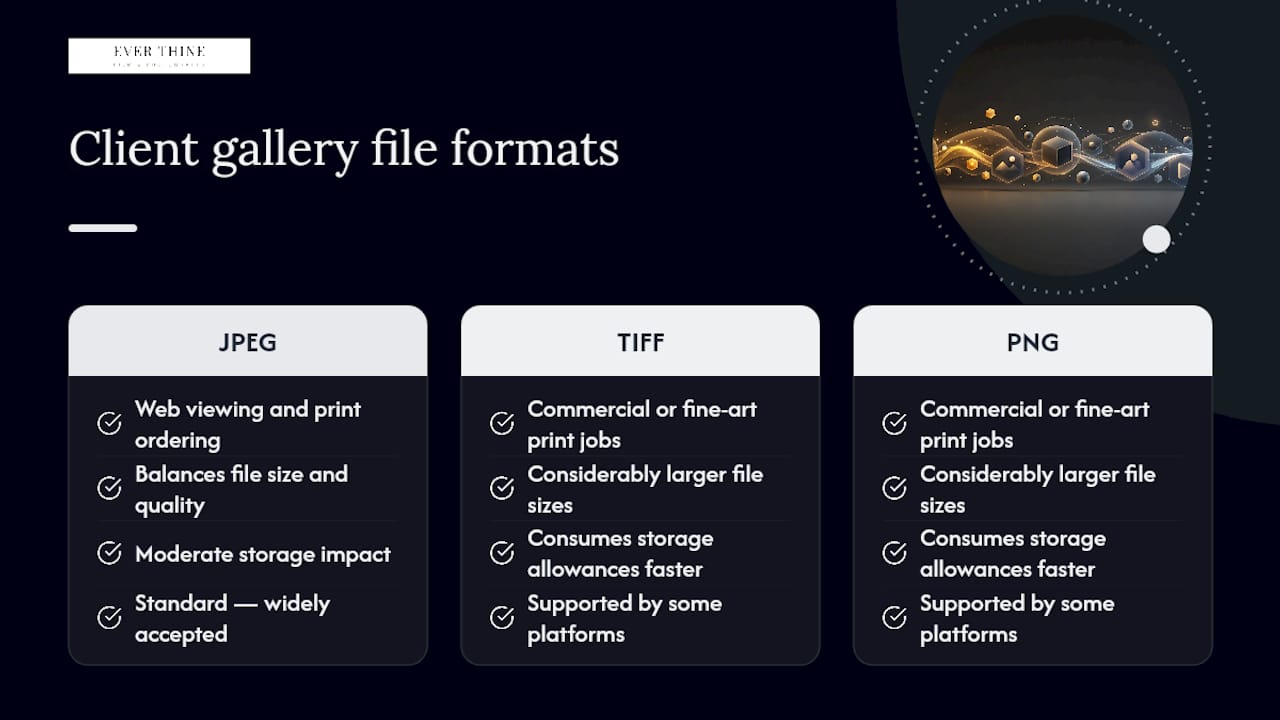
Resolution matters more than format for most studios. Galleries typically display a compressed, watermark-protected preview version for browsing, then release the full-resolution file only on download or after payment clears. A wedding delivered at 300 DPI print resolution, generally around 3000 to 5000 pixels on the longest edge depending on your camera’s sensor, gives clients enough quality for large prints and albums without you handing over untouched RAW files.
Few platforms support RAW file delivery well, and most photographers wouldn’t want to anyway. Clients don’t need RAW files, and delivering them undermines the editing work you’ve already done. Video files sit in a different category entirely. Many gallery platforms handle stills only, so if you’re delivering a wedding film alongside photography, check whether the platform supports video hosting or whether you’ll need a separate delivery method for that.
Storage limits often scale with your subscription tier, so a wedding shoot with a large number of final images needs headroom checked before the big day, not after you’ve already uploaded the ceremony.
A note from the studio floor
In practice, one branded gallery link does the job that used to take three emails and a WeTransfer chase. Run the fifteen-minute trial checklist before you send anything to a real client, not after.
Tell clients upfront what to expect: how long the gallery stays live, how downloads are labelled, and when final prints or albums will ship.
Sources
For deeper reading on delivery and proofing workflows, see how to deliver photos online and our wedding proof review guide. Run the trial checklist on any demo gallery before committing.
FAQ
What is a client gallery?
A client gallery is a secure, branded online page where photographers deliver finished images for clients to view, favourite, download and often purchase as prints or albums.
Can you delete the gallery app?
Most client galleries live in a web browser rather than a dedicated app, so there’s usually nothing to install or delete; clients simply open a link.
Do I need both a gallery and a photos app?
No. A client gallery is designed to replace generic photo apps or file-sharing tools for professional delivery, since it adds proofing, branding and download controls that consumer apps lack.
Is there a free client gallery option for photographers?
Several platforms, including Pixpa and PicDrop, offer free tiers or trials with storage and feature limits, though most professional studios upgrade once wedding-day volumes exceed those caps.
How long should a client gallery stay live?
There’s no universal rule, but many photographers set expiry between three and twelve months to protect exclusivity, then archive or extend access on request.
Recommended


Comments