
Why use a shot list: the filmmaker's practical guide

A shot list is the operational checklist that guarantees you capture every image the edit needs and saves hours on set. Without one, you are relying on memory and instinct under time pressure. With one, every crew member knows exactly what is required, in what order, and with what gear.
Three reasons to use one, immediately:
Coverage: every shot the editor needs is written down before you arrive on location, so nothing gets missed.
Efficiency: grouping shots by lighting setup and camera position cuts relighting and repositioning time significantly.
Alignment: the DP, 1st AD, and camera team all work from the same document, which removes guesswork and reduces on-set miscommunication.
The checklist mentality behind a shot list comes directly from professional production practice. Cinematographers and 1st ADs have used them on everything from feature films to single-camera wedding shoots for decades. The discipline is the same regardless of crew size.
Key takeaways
A shot list is the single most effective tool for guaranteeing coverage, reducing setup time, and aligning your crew before and during a shoot.
Point | Details |
Coverage comes first | Every shot the editor needs should be written down before you arrive on location. |
Group by technical setup | Sequencing shots by lighting and camera position saves hours of repositioning time per day. |
Collaborate on the list | The DP and 1st AD should review and reorder the list so it reflects the whole team’s knowledge. |
Tag priorities clearly | Mark shots as essential or nice-to-have so the crew can manage time without a conversation. |
Weddingfilmphotography handles this | Every package includes pre-wedding shot planning and on-the-day coordination across Staffordshire, Derbyshire, and the West Midlands. |
Table of Contents
What is a shot list and how does it differ from a storyboard?
Anatomy of a shot list: what fields should every row contain?
How to make a shot list: a step-by-step workflow you can follow
How shot lists save time: research and who should be involved
Templates and tools: StudioBinder, Shot Lister, and spreadsheet options
Pre-shoot shot list checklist you can print or save to your phone
A filmmaker’s perspective on using shot lists for wedding shoots
What is a shot list and how does it differ from a storyboard?
A shot list is a textual, row-by-row inventory of every image you intend to capture on a given shoot day. Each row represents one shot: its size, angle, camera movement, lens, subject, and estimated duration. Think of it as a detailed checklist of shots that sits between the script and the finished film, translating creative intention into operational instruction.
A storyboard is a visual plan: drawn frames that show what each shot should look like compositionally. A script is the narrative document. The shot list is neither of those. It is the working document the crew actually uses on the day to stay organised and on schedule.
The practical difference matters. A storyboard frame showing a close-up of a bride’s hands becomes a single row on the shot list: Scene 3 / Shot 12 / ECU / Hands / Static / 50mm / Ceremony table / 2 min. The storyboard communicates the look; the shot list communicates the logistics.
Anatomy of a shot list: what fields should every row contain?
A well-built shot list uses consistent columns so any crew member can read it without asking questions. The fields below are the standard set used across professional productions:
Column | What to record | Why it matters |
Shot number | Sequential number | Lets crew call out shots by number on set |
Scene | Scene or sequence reference | Links the shot back to the script |
Shot size | WS, MS, CU, ECU, etc. | Camera operator and focus puller know the frame instantly |
Angle | Eye level, low angle, OTS, etc. | Determines rig height and blocking |
Camera movement | Static, pan, track, handheld | Informs grip and dolly requirements |
Lens / focal length | 35mm, 50mm, 85mm, etc. | Helps ACs prepare glass in advance |
Subject / action | What is happening in frame | Keeps the shot clear for non-camera crew |
Location | Room, exterior, specific spot | Enables grouping by location for scheduling |
Time estimate | Minutes per shot | Feeds the shooting schedule |
Notes | Lighting cue, audio flag, etc. | Catches anything that does not fit another column |
The lens column deserves particular attention. Grouping shots by lens and lighting setup reduces lens changes and relights, which is where production time disappears fastest. Keeping that column visible means your AC can have the next lens ready before you call cut on the current shot.
A single example row: Shot 007 / Scene 4 / CU / Eye level / Static / 85mm / Groom’s reaction at altar / Ceremony aisle / 3 min / Capture without flash.
How to make a shot list: a step-by-step workflow you can follow
The process below works for a short film, a commercial, or a wedding day. Adjust the scale, not the steps.
Break down the script or scene brief. Read through the script or brief and note every moment that needs to be on screen. Each distinct image is a potential shot. Do not filter yet.
Assign shot specs to each image. For every shot you have identified, fill in the columns: size, angle, movement, lens, subject, location, and a rough time estimate. The cinematographer usually leads this stage in collaboration with the director and producer.
Reorder for production logic. Sort shots by location and lighting setup rather than story order. All shots in the same room with the same lighting rig go together, regardless of where they fall in the narrative. This is the single biggest time-saving step.
Estimate times and build a schedule. Add time estimates per shot and total them by setup. Compare the total against your available hours. If the numbers do not add up, cut now rather than on the day.
Mark priority tiers. Label each shot as either ‘essential’ or ‘nice-to-have’. Essential shots are non-negotiable. Nice-to-haves get attempted if time allows. This protects coverage when the day runs short.
Review with the DP and 1st AD. Share the draft and let them challenge the order, flag missing shots, and add technical notes. The list becomes genuinely useful once it reflects the whole team’s knowledge, not just the director’s.
Export and distribute. Share a PDF or printed copy with every department head before the shoot. On the day, the list is a live document: tick off completed shots and adjust as circumstances change.
Pro Tip: Mark nice-to-have shots with a simple asterisk or a different colour so the crew can see at a glance what is optional. On a tight schedule, that visual cue saves the conversation.
Why use a shot list: concrete benefits on set and in post
The most direct benefit is coverage. A well-structured shot list reduces the chance of missing essential footage, which is often the most expensive mistake in production. Missing a cutaway discovered in the edit means a reshoot or a compromise. A shot list makes that outcome far less likely because the required images are written down and tracked.
On set, the efficiency gains come from grouping. When you sequence shots by shared technical requirements rather than story order, you avoid relighting the same space twice and repositioning the camera unnecessarily. A morning spent on wide establishing shots in one location, then moving to close-ups in the same lighting, is faster than bouncing between setups to follow the script’s narrative sequence.
Communication is the less obvious benefit. When the DP, 1st AD, gaffer, and camera operator all hold the same document, decisions happen faster. Nobody needs to ask what comes next or which lens is required. The list answers those questions before they are asked.

There is also a creative argument for shot lists that experienced filmmakers often cite. Once essential coverage is secured, the director is free to notice spontaneous opportunities on set without the anxiety of wondering whether the required shots are in the can. The list protects the essentials so you can afford to improvise around them.
For solo operators and small crews, the benefit is even more concentrated. A shot list acts as a blueprint that makes a shoot feel lighter, because the decision-making is done in advance rather than under pressure on the day.
How shot lists save time: research and who should be involved
Sequencing shots by shared technical requirements saves hours of setup and repositioning time per day. That is not a theoretical claim. Production workflows that group by lighting position and camera angle consistently outperform those that follow story order, because every relighting and reposition costs time that compounds across a shoot day.
The collaboration piece is equally important. Experienced filmmakers are clear that the most valuable part of shot listing is the review with the DP and 1st AD. When those two have shaped the list, it becomes a shared roadmap rather than a director’s private note. The DP knows which setups can be combined; the 1st AD knows how long each transition takes. Their input turns a good list into a realistic one.
Pro Tip: After the DP and 1st AD review, run a final time-check: add up the estimates per setup and compare against the day’s available hours. If you are over by more than 20%, cut nice-to-haves before you arrive on set, not during.
A shot list is a technical, functional document any crew member should be able to interpret. If only the director can read it, it has not done its job.
The shot list functions as a living document: update it after rehearsals, adjust it when locations change, and use it to inform the shooting schedule rather than treating it as fixed once written.
On-set best practices and common mistakes to avoid
Do:
Number every shot sequentially so crew can call them out by number without ambiguity.
Group shots by setup and mark the setup change clearly so the 1st AD can call transitions.
Share printed copies or a PDF with the camera team, AD, and gaffer before the day starts.
Tick off completed shots in real time so you always know where you stand against the schedule.
Keep the language in each row short and standardised. A shot list should be written as a functional document any crew member can interpret, not as a private creative note only the director understands.
Don’t:
Over-detail notes to the point where rows become paragraphs. A short, clear list is often more useful than an over-engineered one, particularly on small shoots where the crew is reading it quickly between setups.
Plan more shots than the crew can execute in the available time. An overfull list creates pressure and leads to rushed shots or skipped essentials.
Treat the list as finished once it is written. Conditions change; the list should change with them.
The essential/nice-to-have tagging system is the single most practical tool for managing a tight schedule. When time runs short, the crew does not need a conversation about priorities. The tags answer the question before it is asked.
Templates and tools: StudioBinder, Shot Lister, and spreadsheet options
The right tool depends on your crew size, shoot complexity, and how you need to share the list.
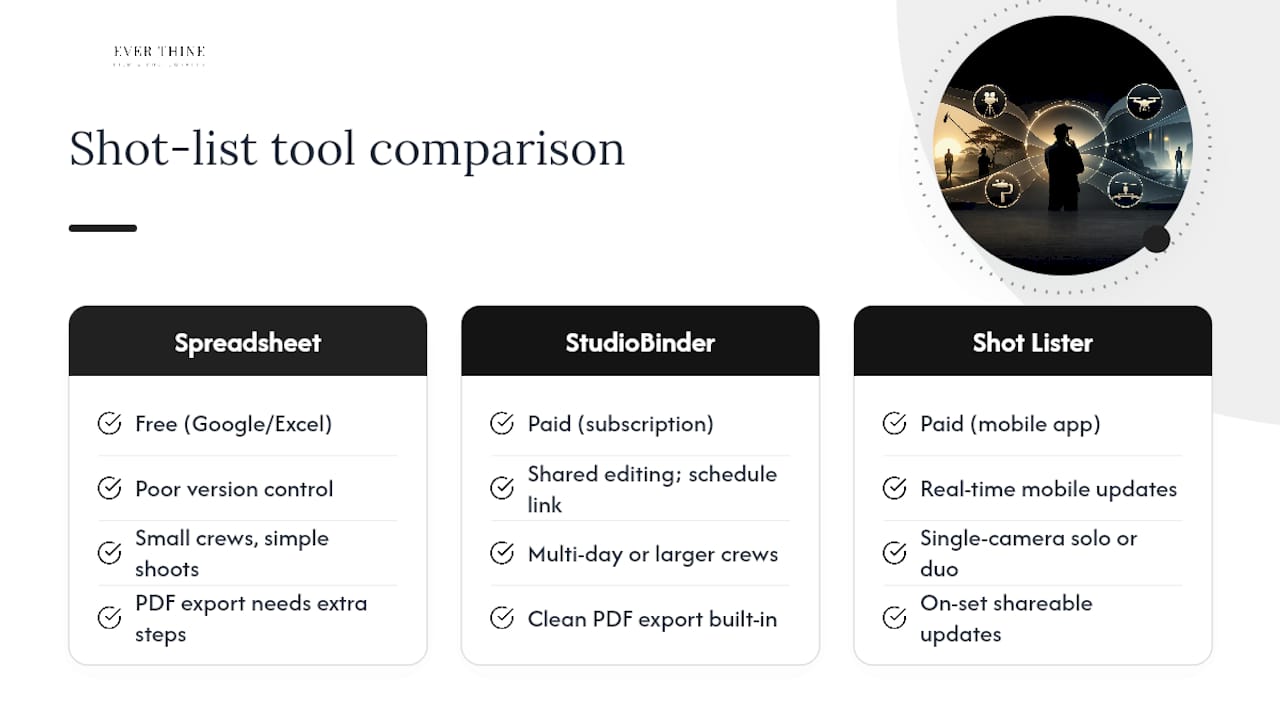
Spreadsheet templates are the starting point for most filmmakers. A Google Sheet or Excel file with the ten columns described above costs nothing and works immediately. The limitation is sharing: version control gets messy when multiple people are editing, and exporting a clean PDF for printing takes extra steps.
StudioBinder is purpose-built shot-list software with features that go beyond a spreadsheet: tagging shots as essential or nice-to-have, grouping by lens or setup, shared editing across departments, and clean PDF export. It also connects the shot list to the shooting schedule, which removes a manual step. For multi-day shoots or any production with more than two or three crew members, the collaboration features alone justify using it over a spreadsheet.
Shot Lister is a mobile-first app designed for on-set use. Its strength is speed: you can reorder shots by drag-and-drop, mark shots complete with a tap, and share updates in real time. For a single-camera operator working alone or with one assistant, Shot Lister keeps the list accessible without needing a laptop open on set.
For wedding shoots and small crews, the priority is shareability and a clean export format. A PDF that can be printed and handed to the photographer, videographer, and coordinator before the ceremony is worth more than a feature-rich platform nobody has time to learn. Simple productions benefit most from concise shot lists, and the tool should match that simplicity.
Pre-shoot shot list checklist you can print or save to your phone
Run through this before you leave for the location:
All essential shots are marked and distinguishable from nice-to-haves.
Shots are grouped by lighting setup and camera position, not story order.
Lens column is filled in and the AC has seen it.
Time estimates are totalled per setup and checked against available hours.
Crew have received a printed copy or PDF: camera operator, 1st AD, gaffer, and coordinator.
Nice-to-have shots are tagged clearly (asterisk, colour, or separate section).
A blank column or margin is available for ticking off completed shots on the day.
Any location-specific notes (access times, noise restrictions, natural light windows) are in the notes column.
For a wedding photography checklist workflow, export the list as a PDF and print at least three copies: one for the camera team, one for the coordinator, and one for the lead photographer or videographer. Keep a digital version on your phone as a backup.
Pro Tip: Create a separate one-page ‘essentials only’ version of the shot list for the coordinator or venue manager. They do not need lens specs; they need to know which moments require the couple’s attention and when.
A filmmaker’s perspective on using shot lists for wedding shoots
Wedding shoots sit in an unusual position in production planning. The schedule is fixed by the ceremony and reception programme, not by the director. Lighting changes without warning. Guests move unpredictably. And there is no second take.
That is exactly why a shot list matters more on a wedding day than on a controlled set, not less. When I work through a wedding videography planning guide with a couple before their day, the shot list is the document that turns their priorities into a production plan. The couple tells me which moments matter most: the first look, the ring exchange, the father-of-the-bride speech. Those go on the list as essentials. Everything else is a nice-to-have.
What the shot list actually protects is the candid work. Once the formal and essential shots are secured, the camera is free to follow the room rather than a script. The best wedding images are almost always unplanned, but they only happen when the planned shots are already in the bag. A shot list is what makes that freedom possible.
For small crews, the list also removes the need for constant verbal coordination. The photographer and videographer can work independently because they both know what is required and in what order. That reduces overlap, prevents missed moments, and keeps the day feeling relaxed for the couple rather than managed.
Planning your wedding coverage with Weddingfilmphotography
Couples who want their wedding day covered with the same level of preparation described in this article do not need to build a shot list themselves. Weddingfilmphotography handles the planning, the shot prioritisation, and the on-the-day coordination as part of every package, so the couple can focus on the day rather than the logistics.
[
Based in Staffordshire and covering Derbyshire, Worcestershire, the West Midlands, and beyond, Weddingfilmphotography offers documentary-style photography and cinematic videography for couples who want coverage that is both thorough and unobtrusive. Every booking includes a pre-wedding planning session where shot priorities are agreed, grouped, and confirmed with the team before the day.
To check availability or talk through your coverage priorities, visit the Staffordshire wedding photography page or the Derbyshire wedding photography page and get in touch directly.
Sources
For a printable one-page checklist, the StudioBinder free template is the fastest starting point. Download it, remove any columns your crew does not need, and export as a PDF before the shoot.
FAQ
Is a shot list necessary for every shoot?
For any shoot where missing a specific image has consequences, yes. A shot list is the only reliable way to guarantee coverage when you cannot reshoot.
Who should make the shot list?
The cinematographer typically creates the shot list in collaboration with the director and producer, then shares it with the 1st AD for scheduling review. On smaller shoots, the director often builds the first draft alone.
Should I give my photographer a shot list?
Yes. Sharing a shot list with your photographer aligns expectations, prevents missed moments, and means the photographer knows which shots are non-negotiable before the day starts. A brief for your photographer built around a shot list is the clearest way to communicate priorities.
Does Steven Spielberg use a shot list?
Yes. Spielberg is known for meticulous pre-production planning, including detailed shot lists and storyboards. The practice is standard across professional directors regardless of experience level.
Can a shot list limit creativity on set?
The opposite tends to be true. Once essential shots are secured, the director is free to pursue spontaneous opportunities without risking coverage. The list protects the necessities so the creative work can happen around them.
Recommended


Comments